At Sevendays, we work with AI technology for our clients every day. Whether it's building chatbots, automating workflows, or setting up RAG systems, we constantly see new tools and frameworks emerge. The list seems endless, and every week brings more.
The problem? Every new project raised the same questions: which tool fits where? Can we reuse this? Is this an alternative to what we already have, or does it fill a different role? And when a client asks for "an AI agent" what are we actually talking about?
That's why we developed the AI Agent Component Map: a visual framework that structures the jungle of AI-related tools. Not by lumping everything together, but by making clear what role a tool plays and in which phase of an agent it's used.
The core: separation of responsibilities
Our diagram divides an AI agent architecture into four main areas:
Interface Layer
the gateway. How do requests come in and how do responses go out? This could be a chat interface, but just as easily an API, a Slack bot, webhooks, or a voice assistant. The choice here determines who or what can talk to your agent.
Infrastructure
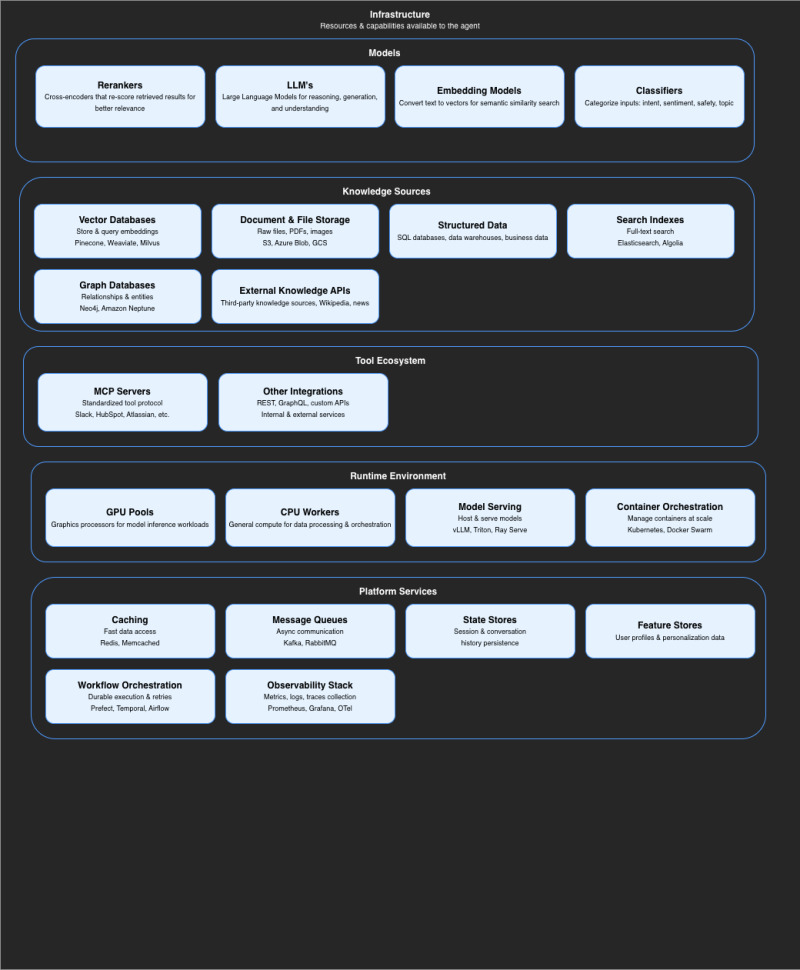
the foundation. What resources and capabilities does your agent have at its disposal? This includes your models (not just LLMs, but also embedding models, rerankers and classifiers), your knowledge sources (vector databases, document storage, SQL databases), your tool integrations, and the platform services that keep everything running.
Control Plane
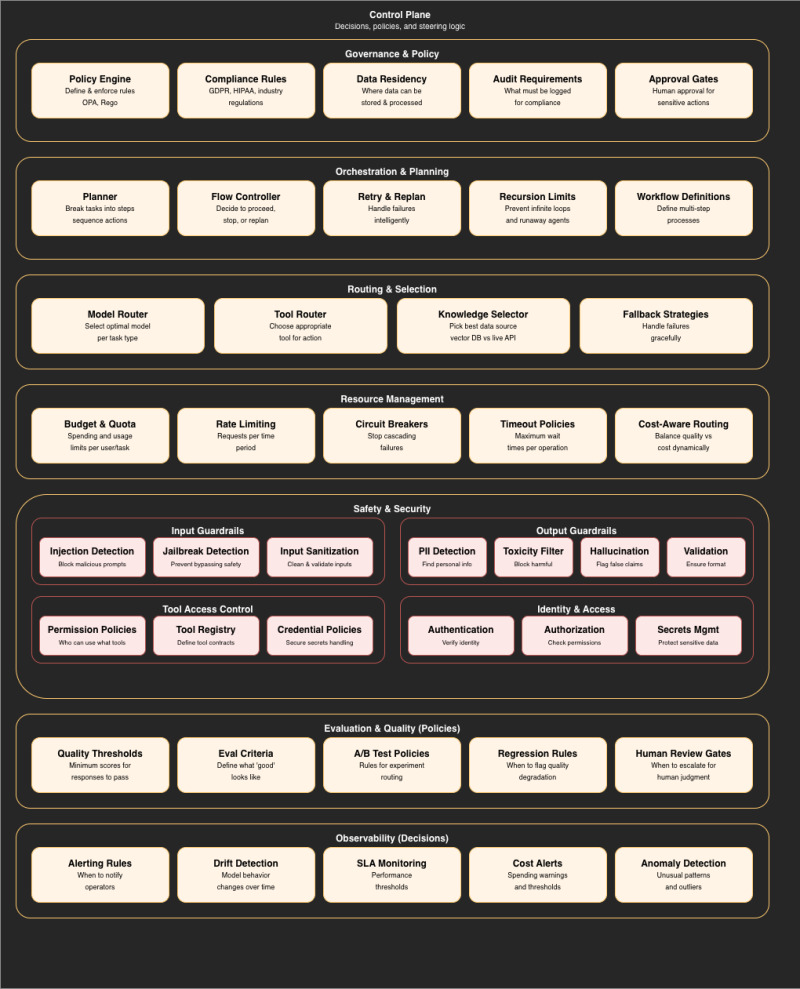
the decision maker. This is where it's determined what should happen. What steps are needed to answer this question? Which model do we use? Which tool do we call? Is this user allowed to perform this action? Is the output good enough? These are often also LLM calls, but focused on planning, routing and evaluation, not on producing the final result.
Execution Plane
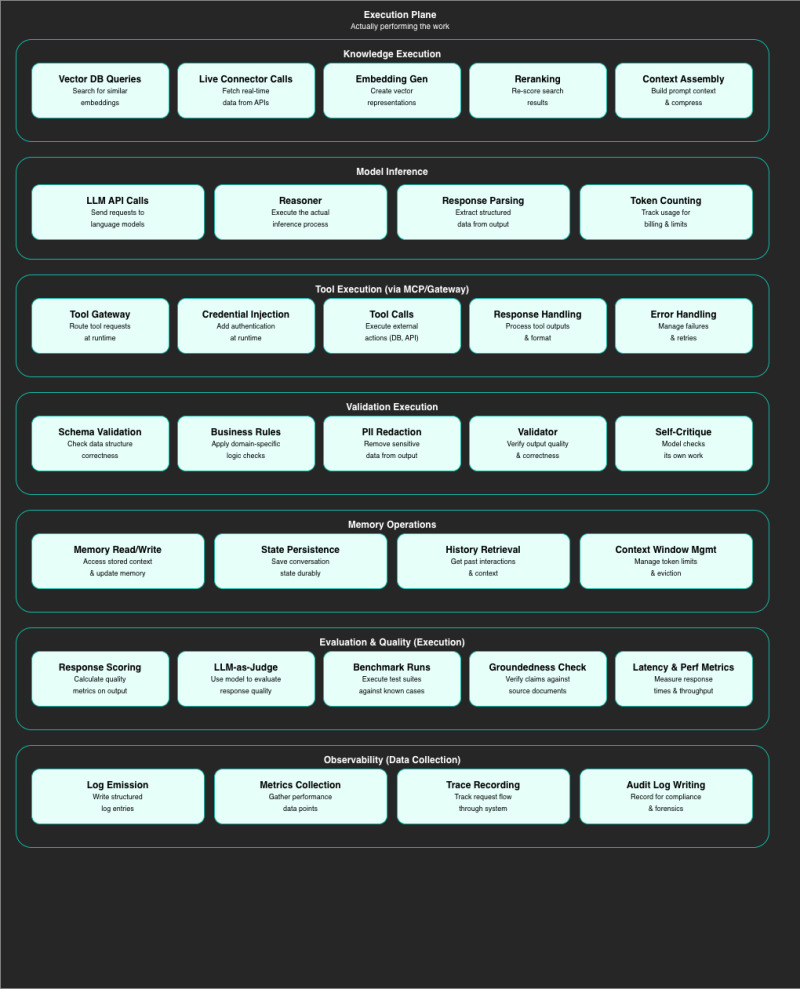
the executor. This is where the work determined by the Control Plane gets done. The query to the vector database, the API call to an external system, the LLM call that actually generates the answer or writes the summary.
Why this separation matters
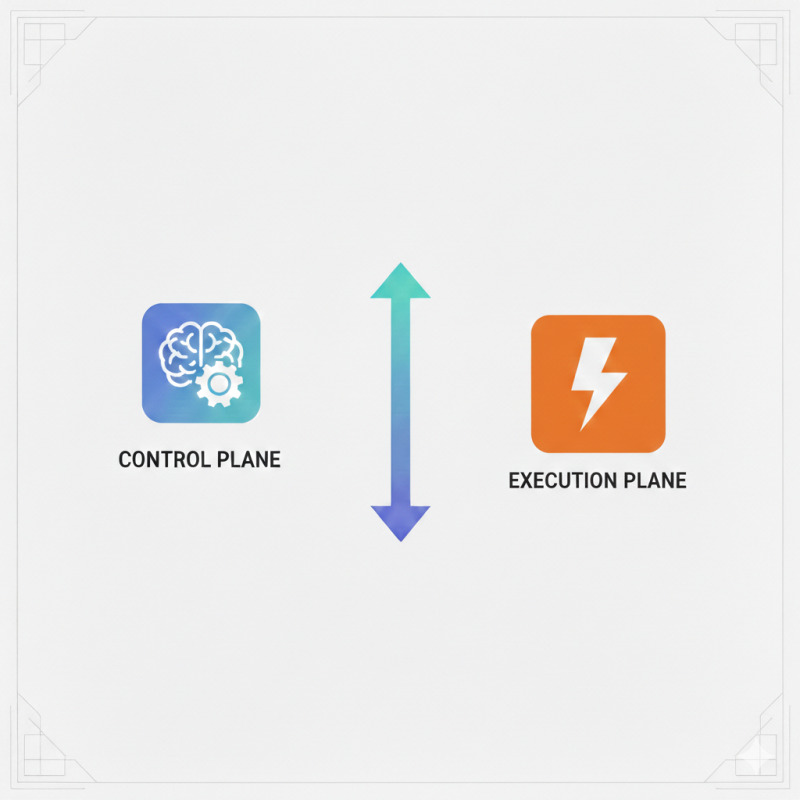
The power of this framework lies in the distinction between deciding and executing. Both can use LLMs, but with different responsibilities.
A planner LLM that determines which steps are needed to answer a question? That's Control Plane. The LLM that then actually formulates the answer? That's Execution Plane. An LLM-as-Judge that evaluates the quality of a response afterward? Control Plane again.
Take another example: your agent needs to retrieve data from your CRM. In the Control Plane sits the logic that determines whether the user has access to that data, which tool gets called, and what should happen if the call fails. In the Execution Plane, the actual API call happens, credentials get injected, and errors get handled.
Take a tool like Windmill: as workflow orchestration it sits in your Infrastructure. But the flow control that determines when a step should be retried or when to escalate? That's Control Plane logic. And the actual execution of your scripts and API calls? That's Execution Plane. One tool, three layers.
By separating deciding and executing, you can adjust policies without changing your execution logic and vice versa.
The layers in detail
Infrastructure: more than just an LLM
When people think of AI, they often only think of the language model. But the Infrastructure layer shows how much more is involved.
Models aren't just LLMs. You need embedding models to convert text to vectors for semantic search. Rerankers to reshuffle search results for better relevance. Classifiers to categorize input by intent or sentiment before sending it to your LLM.
Knowledge Sources determine where your agent gets its knowledge. Vector databases for semantic search, traditional SQL databases for structured data, graph databases for relationships between entities, and external APIs for real-time information. The choice here directly impacts what your agent can and cannot know.
Tool Ecosystem defines what your agent can do. Through MCP (Model Context Protocol) or other integrations, your agent gains the ability to interact with external systems, from your CRM to your calendar to your database.
Platform Services are the silent forces that keep everything running: caching for fast responses, message queues for asynchronous processing, state stores for conversation memory, and workflow orchestration for complex multi-step processes.
Control Plane: thinking about what to do
The Control Plane determines the strategy, before anything gets executed.
Orchestration & Planning determines how complex tasks get broken down. How do you break a question into substeps? When do you continue, when do you stop, when do you replan? How do you prevent your agent from ending up in an infinite loop?
Routing & Selection makes dynamic choices. Not every question needs to go to your most expensive model. Not every knowledge need has to go through your vector database. Smart routing can save costs and improve performance.
Safety & Security is where you define your guardrails. Input validation to prevent prompt injection. Output filtering to detect PII or flag hallucinations. Access control to determine who can use which tools.
Governance & Policy is about compliance and auditability. Where can data be stored? What must be logged? When is human approval required?
Execution Plane: doing the work
The Execution Plane executes what the Control Plane has decided.
Knowledge Execution performs the actual queries to your knowledge sources. Vector searches, live API calls, embedding generation, context assembly.
Model Inference is where your LLM does the actual work, generating the answer, writing the summary, producing the code.
Tool Execution handles the interaction with external systems. The tool gateway routes requests, credentials get injected, responses get processed, errors get handled.
Validation Execution applies the policies from the Control Plane. Schema validation, business rules, PII redaction.
Memory Operations manages the conversation context. Reading and writing to memory, state persistence, history retrieval, context window management.
How to use the diagram
The AI Agent Component Map isn't a checklist you need to complete in full. It's a thinking framework that helps you:
Make targeted choices
A simple Q&A chatbot based on your FAQ needs a completely different architecture than an autonomous agent that schedules appointments and sends invoices on behalf of your client. The diagram shows which components you do need, so you don't blindly implement everything or overlook important aspects.
Place tools
When you encounter a new tool, you can immediately see where it fits. Is it Infrastructure (a new vector database)? Control Plane (a policy engine)? Execution Plane (a tool gateway)? Or does it play a role in multiple layers?
Identify gaps
By comparing the diagram against your current architecture, you can see where you might be falling short. Have you thought about output guardrails? What happens when a tool call fails? How do you manage conversation memory?
Communicate
The diagram makes it easier to discuss what you're building with stakeholders. Instead of abstract concepts, you can visually show which layers you're implementing and why.
Conclusion
The AI tooling market is growing explosively. Every week new frameworks, new models, new platforms appear. Without a clear framework, you get lost in the possibilities.
The AI Agent Component Map gives us at Sevendays that structure: a visual map that makes clear what role a tool plays and in which phase it's used. Not as a rigid blueprint, but as a compass for making informed choices.
Because ultimately, it's not about how many tools you use, but whether you have the right tools in the right place.
More blogposts

AI-powered proposals that close more deals
12 March 2026
7 min
-small.webp)
Smarter SEO and GEO with JSON-LD
09 March 2026
4 min

Every Message, Every Channel: Why We're Speaking at AI5050
05 March 2026
6 min

From production floor to connected AI solutions: why human + machine truly works
03 February 2026
5 min